Turn your Odoo website into a complete B2B wholesale lead-generation marketplace — supplier storefronts, price-on-request inquiries, RFQ buy-requirements, quotes, membership plans and Trade-Assurance escrow orders with live online payments.
Odoo 18 · Website AppB2B Multivendor Marketplace
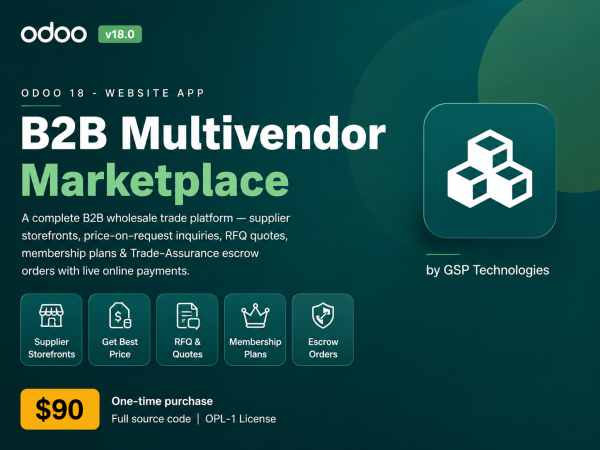
Turn your Odoo website into a complete B2B wholesale lead-generation marketplace — supplier storefronts, price-on-request inquiries, RFQ buy-requirements, quotes, membership plans and Trade-Assurance escrow orders with live online payments.
Supplier Storefronts
Get Best Price
RFQ & Quotes
Membership Plans
Escrow Orders
Live Payments
Only $90 · One-time purchase
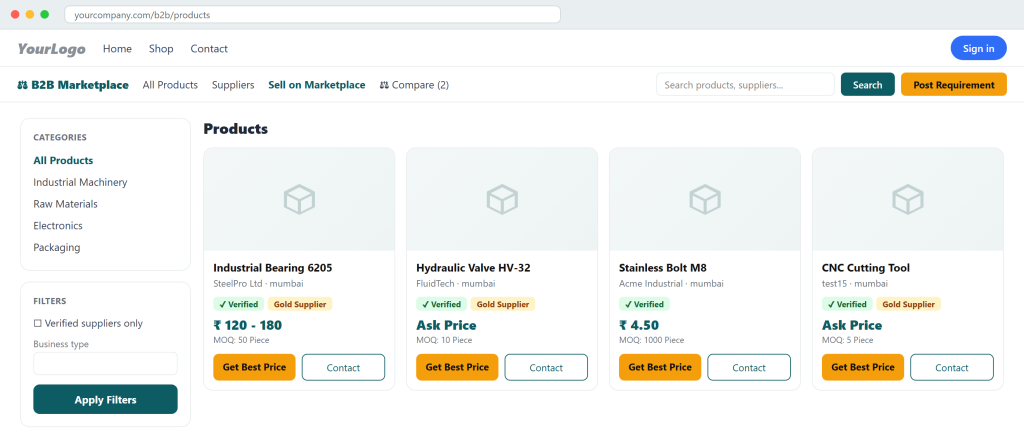
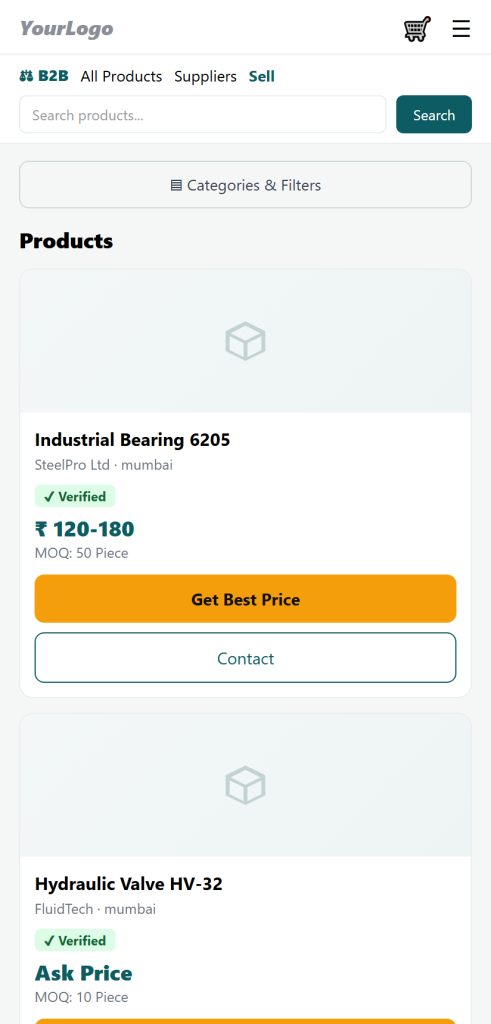
The B2B storefront — wholesale product catalog with price-on-request, MOQ and trust badges.
Product OverviewA wholesale marketplace built the way B2B actually works
Not a cart-and-checkout shop — a lead-generation platform where buyers ask and suppliers respond.
Standard Odoo eCommerce is designed for retail: fixed prices, add-to-cart, instant checkout. But wholesale trade doesn’t work that way. B2B buyers want a quote, negotiate on MOQ (minimum order quantity), compare suppliers, and only then place an order. B2B Multivendor Marketplace rebuilds your Odoo website around that reality — modelled on how leading wholesale trade portals operate — while staying 100% native to Odoo’s website, portal and payment framework.
The problem it solves
Odoo has no wholesale/quotation-driven marketplace out of the box — no multi-supplier storefront, no price-on-request flow, no RFQ routing, no supplier monetisation.
Who it’s for
Marketplace operators, industry directories, wholesale & manufacturing portals, trade associations, and sourcing platforms monetising supplier listings and buyer leads.
Who it’s for
Two built-in revenue streams: paid supplier memberships (Silver / Gold) and Trade-Assurance escrow orders — both settled with live online payments.
Why choose this over plain Odoo
A true multi-vendor storefront + supplier self-service portal.
Price-on-request, fixed and price-range products with enforced MOQ.
Lead engine: inquiries, RFQs, quotes and contact-reveal with lead credits.
Recurring revenue from tiered membership plans, sold with live payment.
Trade-Assurance escrow order lifecycle with online payment into escrow.or storefront + supplier self-service portal.
Verification badges, ratings & reviews that build buyer trust.
Runs on Odoo’s own website, portal & payment stack — no third parties.
Fully responsive storefront and portal — desktop, tablet and mobile.
Complete Feature SetEverything included in the module
Not a cart-and-checkout shop — a lead-generation platform where buyers ask and suppliers respond.
Free / Silver / Gold tiers with lead quotas, product limits and badges.
Live Online Payments
Memberships and escrow orders paid via Odoo providers, auto-activated.
Installation & ConfigurationUp and running in minutes
Install the module — upload via Apps → Import Module, or copy to your addons path and install B2B Multivendor Marketplace. Website, Portal, Mail & Payment install automatically as dependencies.
Enable a payment provider — turn on at least one Odoo payment provider (Demo for testing; Stripe / Razorpay / PayPal for production) so memberships and escrow orders can be paid.
Create categories — in the B2B Marketplace backend app, add the product categories buyers and suppliers will use.
Review membership plans — Free, Silver and Gold are seeded on install; adjust prices, lead quotas and product limits.
Onboard suppliers — they self-register via “Sell on Marketplace,” or you create them in the backend and set Active / Verified.
Go live — the storefront is available at /b2b with a website menu added automatically.
Access & permissions: ships with two security groups — B2B Manager (full backend control) and B2B Supplier. Suppliers operate as standard portal users; the public storefront safely exposes only active suppliers and published products.
Complete Page MapEvery page in the marketplace, explained
The module adds a full set of storefront pages plus dedicated Buyer and Supplier portals. Here is what each page does.
Public Storefront (available to every visitor)
Marketplace Home
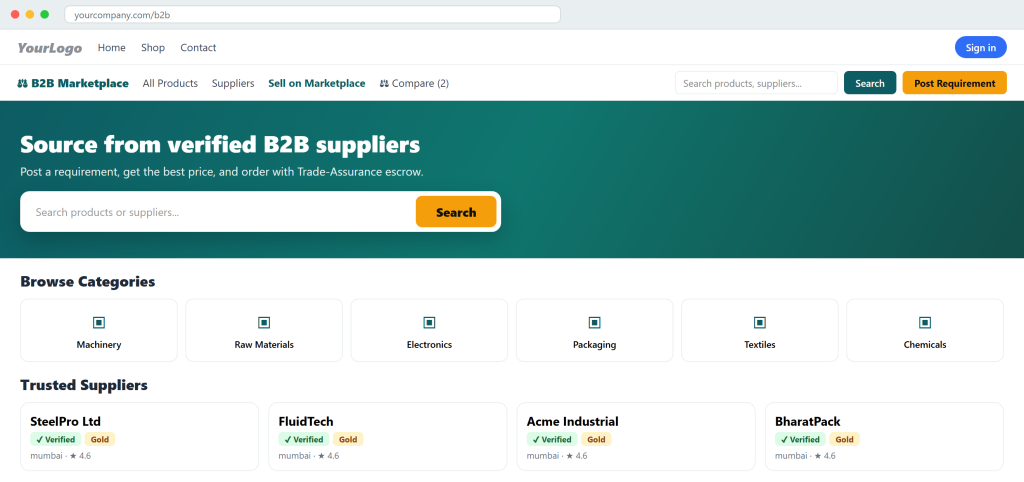
Landing page with hero, search, headline stats, category tiles and featured/trusted suppliers — the entry point to the whole marketplace.
Product Catalog
All published products with keyword search, category / verified-supplier / business-type / max-MOQ filters (collapsible on mobile) and pagination.
Product Detail
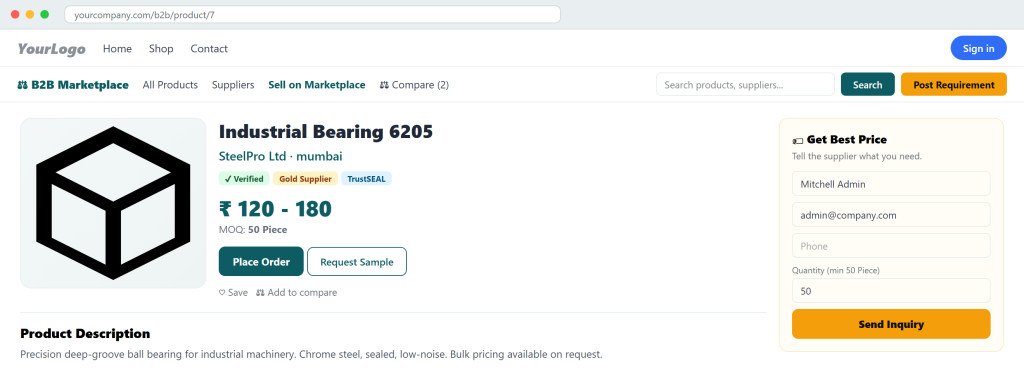
Full product page with images, price display (on-request / fixed / range), MOQ, specs, the “Get Best Price” inquiry form, Place Order (fixed price), Save and Add-to-Compare.
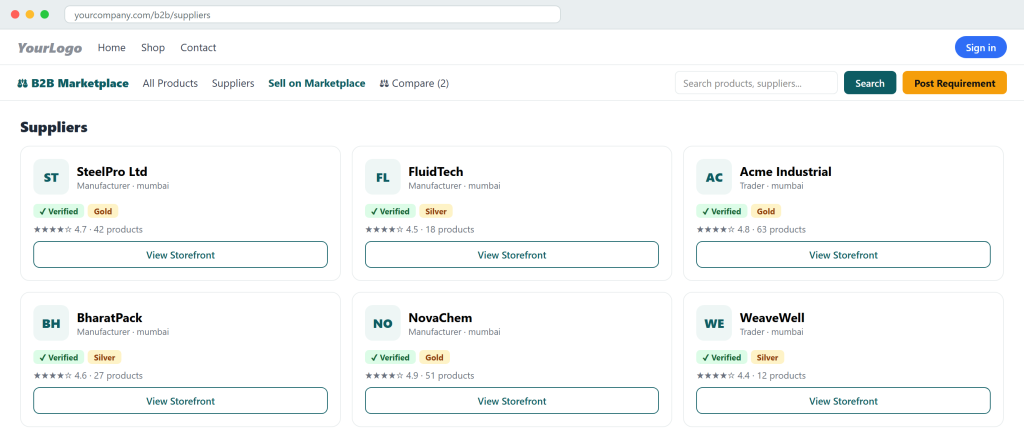
Supplier Directory
Browse all active suppliers with verified / business-type / rating filters.
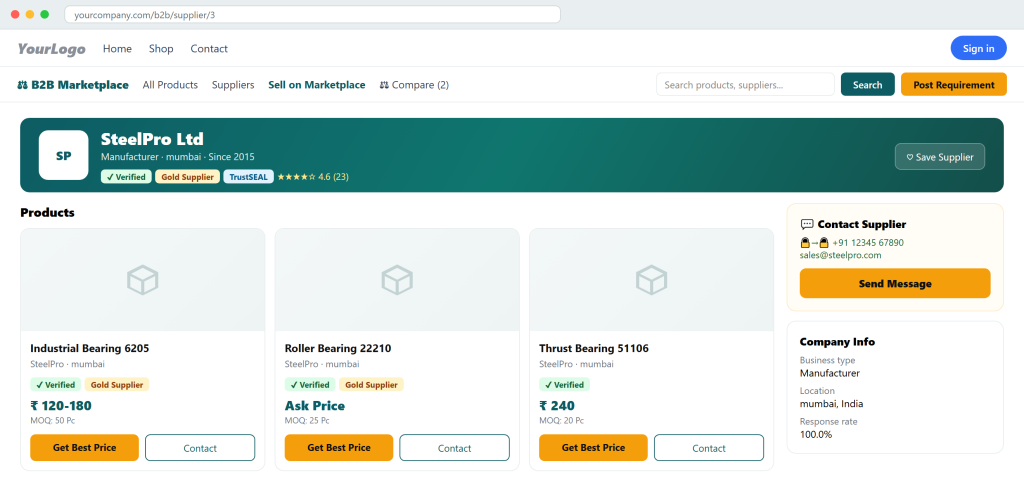
Supplier Storefront
A vendor’s branded page — banner, logo, badges, product grid, company info, certifications, reviews and the Contact Supplier panel.
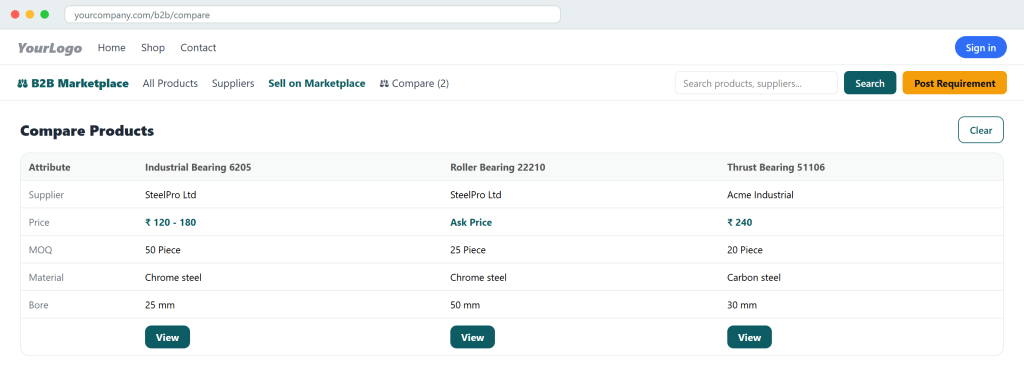
Compare Products
A side-by-side table (up to 4 products) across supplier, price, MOQ and every spec.
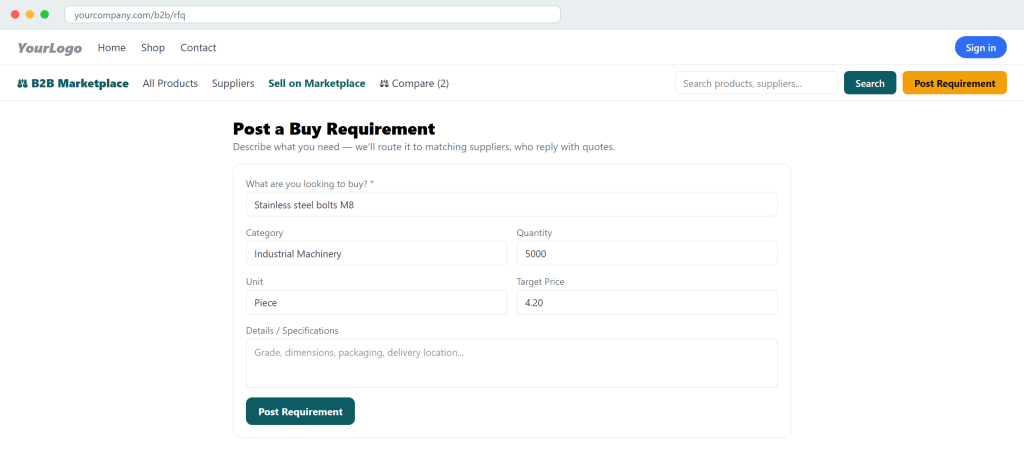
Post a Buy Requirement (RFQ)
Buyers describe what they need; it routes to matching suppliers for competitive quotes.
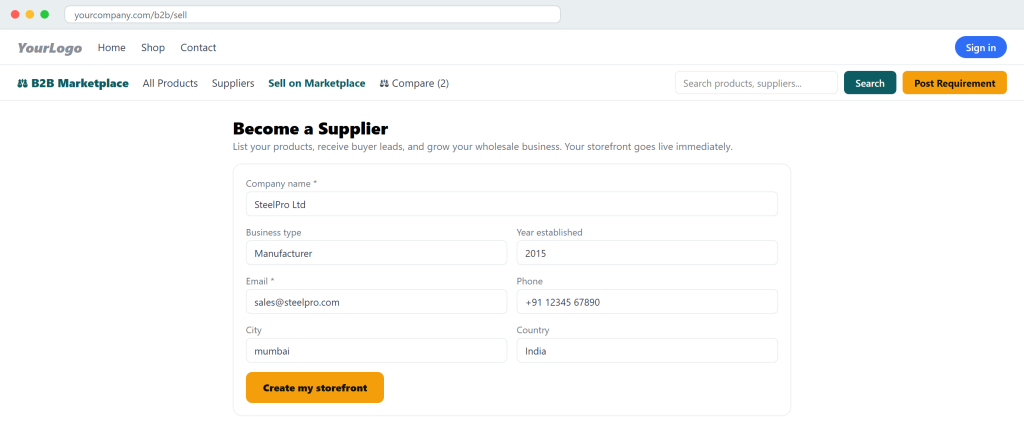
Become a Supplier
Self-registration form — the vendor goes live immediately and gets their storefront & portal.
Buyer Portal (My Account → Buying)
Buyer Dashboard
A quick overview of the buyer’s inquiries, requirements and recent quotes.
My Inquiries
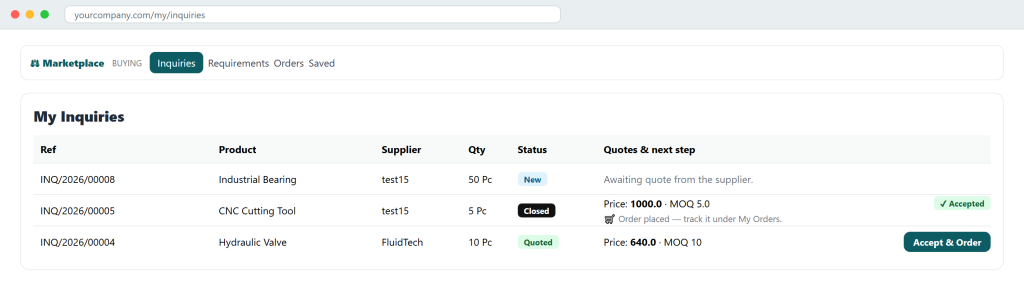
Every “Get Best Price” request with its status, the supplier’s reply and quote, and an Accept & Order button that turns a quote into an order.
My Buy Requirements
All RFQs the buyer posted, with the number of quotes received and their state.
Requirement Detail
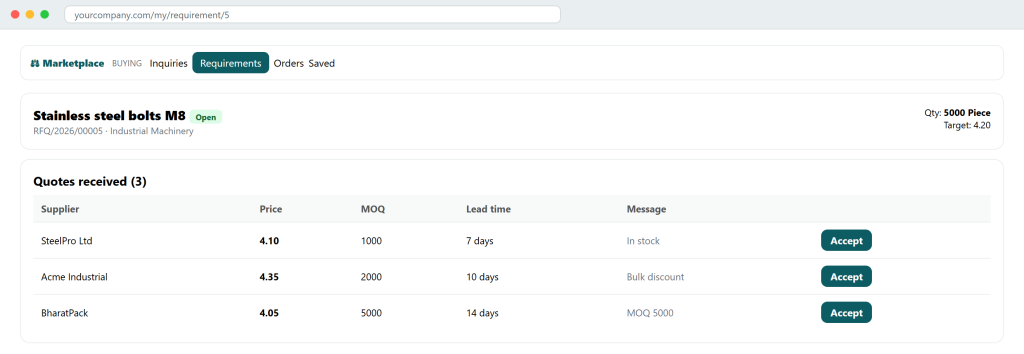
Compare all supplier quotes side-by-side, message suppliers, and accept the winning quote (which creates an order).
My Orders
All trade orders the buyer placed, with escrow status and totals.
Order Detail (Escrow)
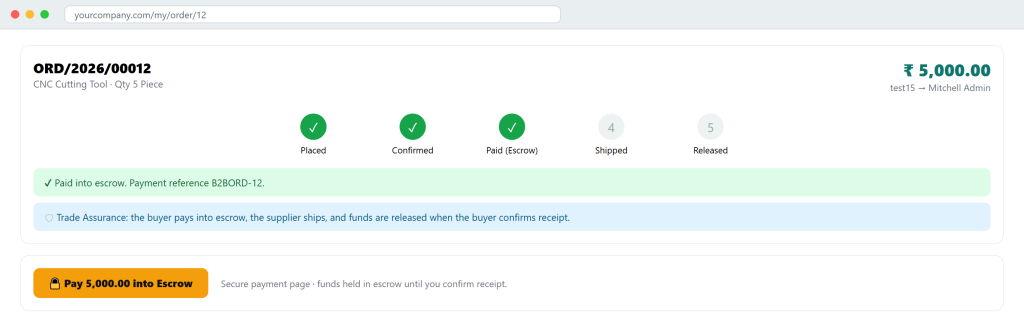
The Trade-Assurance timeline — Confirm the order, Pay into Escrow online, then confirm receipt to release funds.
Saved Items
The buyer’s shortlisted products and suppliers in one place.
Supplier Portal (My Account → Selling)
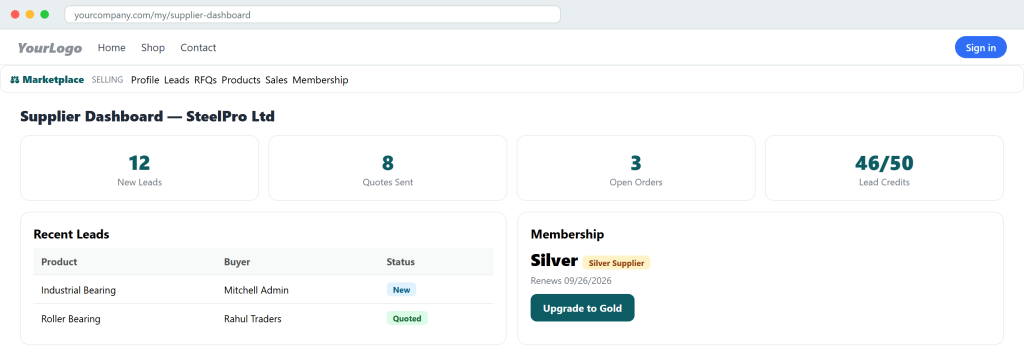
Supplier Dashboard
Overview of leads, quotes, sales and the current membership at a glance.
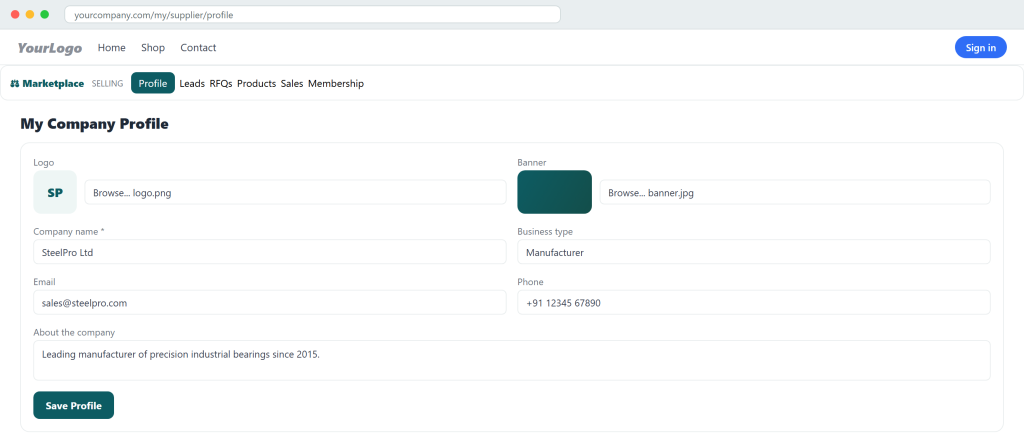
Company Profile
Edit the storefront — upload logo & banner, set business type, about, contact and location. Changes appear instantly on the storefront.
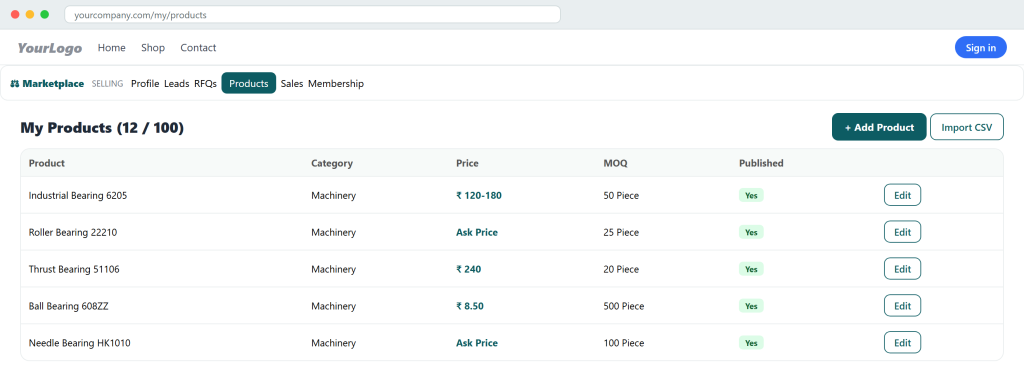
My Products
Manage the catalog — published status, price, MOQ — with pagination and a per-plan product limit.
Add / Edit Product
Create or update a listing with image upload, category, specs, MOQ and validated pricing (fixed / range / on-request).
CSV Bulk Import
Upload a CSV to create many products at once (respecting the plan limit).
Leads Inbox
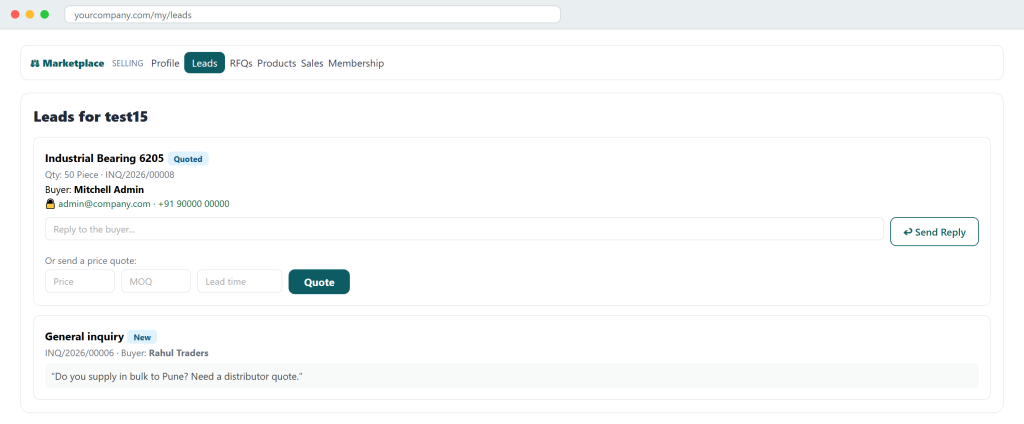
Every buyer inquiry & contact message — reply (reveals buyer contact) or send a quote (price / MOQ / lead time), consuming a lead credit.
RFQs to Quote
Open buy-requirements matched to this supplier, ready to quote on.
Sales Orders
Orders won by the supplier — view escrow status and Mark Shipped when paid.
Membership
Current plan, lead-credit and product usage, and one-click Upgrade (Silver / Gold) paid online with automatic activation.
Backend Menu MapRun the marketplace from one Odoo app
Installing the module adds a dedicated B2B Marketplace app to the Odoo backend. Here is every menu the operator gets.
B2B Marketplace
A single application menu grouping every marketplace record type below.
Inquiries
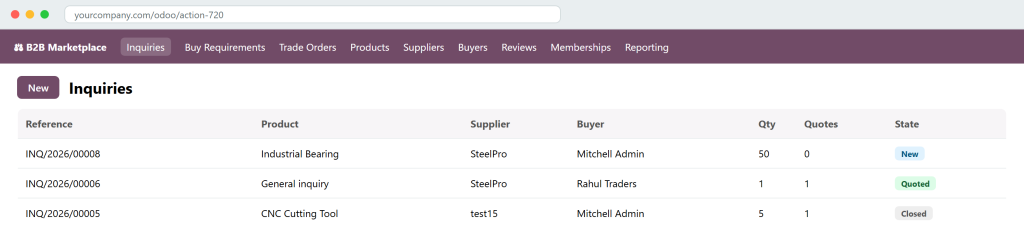
All buyer “Get Best Price” leads — view, filter, follow up, and see the quotes attached to each.
Buy Requirements
All posted RFQs with their matched suppliers, received quotes and awarded state.
Trade Orders
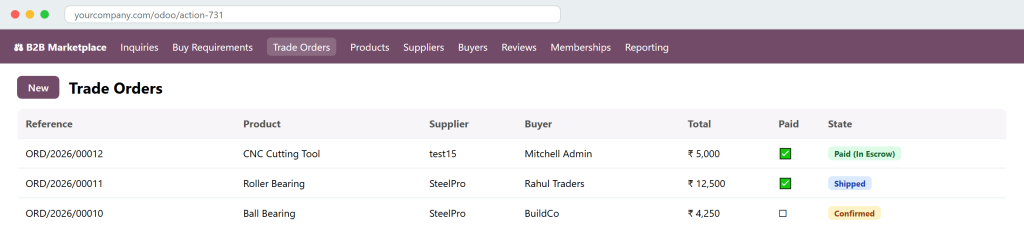
Every escrow order with its lifecycle stage, linked online-payment reference and a “Paid” indicator — the operator can advance or cancel orders here.
Products
The full catalog across all suppliers — images, categories, specs, MOQ, pricing and published status.
Suppliers
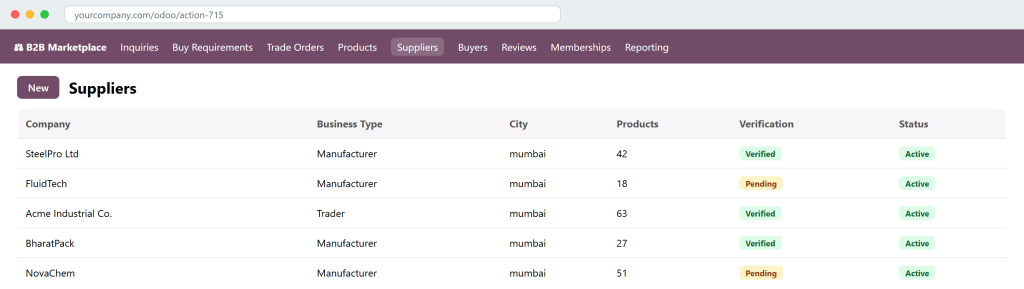
Manage vendors — profile, status (Draft / Active / Suspended) and verification (Draft → Pending → Verified), which drives the storefront badge.
Buyers
A directory of every contact who sent an inquiry, posted a requirement or placed an order — with their activity counts.
Reviews
Moderate buyer ratings & reviews before they appear on supplier storefronts.
Memberships
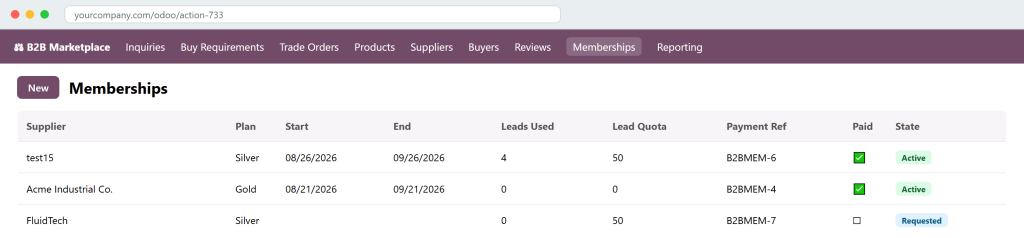
Every supplier subscription — plan, lead usage, payment reference and state — with one-click Activate and the online-payment link.
Reporting
Analytics menus — Inquiry Analysis and RFQ Analysis — to track lead volume and sourcing activity over time.
Configuration
Set up the marketplace — Categories (the product taxonomy) and Membership Plans (edit prices, lead quotas and product limits).
Access is governed by two groups — B2B Manager (full backend) and B2B Supplier — so you can safely delegate day-to-day operations.
ScreenshotsEvery screen, front to back
A guided tour of the storefront, the buyer & supplier portals, and the backend app.
Frontend Storefront
Marketplace home
The public landing page — hero search, category tiles and featured/trusted suppliers.
Product page & “Get Best Price”
Full product detail with supplier badges, MOQ, description and specs, plus the inquiry form (pre-filled and MOQ-enforced) that generates a supplier lead.
Supplier storefront
A branded vendor page with banner, logo, trust badges, product grid, company info and the Contact Supplier panel.
Supplier directory
Browse every active supplier with verification, business-type and rating filters.
Post a Buy Requirement (RFQ)
Buyers describe what they need; the module routes it to matching suppliers for competitive quotes.
Compare products
A side-by-side table across supplier, price, MOQ and every spec — up to four products.
Become a Supplier
Frontend self-registration — the vendor goes live immediately with a storefront and portal.
Buyer & Supplier PortalSupplier dashboard
An at-a-glance overview of leads, quotes, open orders, lead credits and the current membership.
My Products
The supplier manages their catalog — add / edit / import, with published status, price, MOQ and a per-plan limit.
Company profile editor
Vendors upload their logo & banner and edit company details — changes appear instantly on the storefront.
Supplier Leads inbox
Every inquiry and contact message lands here; the supplier replies (revealing buyer contact) or sends a price / MOQ / lead-time quote — consuming a lead credit.
Buyer “My Inquiries”
Buyers see supplier replies and quotes, and click Accept & Order to turn a quote into a trade order at the quoted price.
Requirement detail & quotes
Buyers compare all supplier quotes side-by-side on their RFQ and accept the winning one.
Membership plans
The supplier compares Free / Silver / Gold and upgrades — payment is taken online and the plan activates automatically.
Trade-Assurance escrow order
The visual lifecycle — Placed → Confirmed → Paid (escrow) → Shipped → Released — with the buyer paying online into escrow.
Backend AppBackend — Inquiries
The operator sees every buyer lead with its product, buyer, quantity, quote count and state.
Backend — Trade Orders
Every escrow order with its total, online-payment status and lifecycle stage — advance or cancel from here.
Backend — Suppliers
Manage vendors and move them through verification (Draft → Pending → Verified) to control the storefront badge.
Backend — Memberships
Each supplier subscription with plan, lead usage, online-payment reference, a “Paid” indicator and one-click Activate.
Detailed Feature ExplanationsHow each feature works, in depth
Each supplier subscription with plan, lead usage, online-payment reference, a “Paid” indicator and one-click Activate.
1. Supplier Storefronts & Self-Registration
What it does: Gives every vendor a public, branded storefront and a self-service supplier portal. Visitors can register as a supplier from the website (“Sell on Marketplace”) — they go live immediately, with verification as a trust badge rather than a gate.
How it works: The storefront shows logo, banner, about text, certifications, business type, location, response rate, rating stars and badges (Verified / plan / TrustSEAL / Fast reply). A Contact Supplier panel reveals phone & email to logged-in buyers. Suppliers edit their profile — including logo & banner upload — from My Company Profile.
Where:/b2b/supplier/<id> & /b2b/sell; portal → Profile. Benefit: A professional presence per vendor that builds trust and captures leads.
What it does: Suppliers publish products with true B2B attributes: category, specs, image + gallery, unit, minimum order quantity, and three pricing modes — Price on Request, Fixed price, or a Price Range (min–max).
How it works: Products are added from the portal (My Products) with live price-type validation (fixed > 0; range needs min ≤ max; MOQ positive). Images upload directly. A CSV bulk import creates many at once. The storefront offers category, verified, business-type and max-MOQ filters (collapsible on mobile) with pagination.
Benefit: Accurate wholesale listings without a forced retail price. Dependency: product count is capped by the supplier’s membership plan.
3. “Get Best Price” Inquiries & Supplier Leads
What it does: The core lead engine. Buyers send an inquiry from any product; the supplier receives it as a lead and can reply and/or send a formal quote.
How it works: The inquiry form is pre-filled for logged-in buyers and enforces the product MOQ. The supplier’s Leads inbox lets them reply (which emails the buyer and reveals contact details) or quote (price / MOQ / lead time). The first engagement consumes one lead credit. Buyers track responses under My Inquiries, where an accepted quote converts to an order at the quoted price.
Benefit: A measurable, monetisable lead flow between buyers and suppliers.
4. RFQ / Buy Requirements with Supplier Matching
What it does: Buyers post a Buy Requirement (need, quantity, target price, deadline) that routes to matching suppliers, who compete with quotes.
How it works: A requirement (/b2b/rfq) is matched to suppliers by category and listed in their RFQs to Quote feed (a supplier never sees their own requirement). Suppliers quote; the buyer compares side-by-side and accepts one — awarding the requirement and auto-creating a trade order at the quoted price.
Benefit: Reverse-auction sourcing that drives competitive pricing.
5. Trade-Assurance Escrow Orders with Live Payment
What it does: Converts an agreed price into a secure order with a full escrow lifecycle: Draft → Confirmed → Paid (In Escrow) → Shipped → Completed (funds released).
How it works: Orders come from a fixed-price product, an accepted inquiry quote, or an accepted RFQ quote. The buyer confirms, then pays into escrow through a real Odoo payment provider; the order auto-advances to Paid when the payment clears (signed amount token prevents tampering). The supplier marks shipped; the buyer confirms receipt to release funds.
Benefit: Trust and transaction revenue. Dependency: a configured Odoo payment provider.
6. Supplier Membership Plans (Monetisation)
What it does: Sells tiered supplier subscriptions that gate product count and lead volume, plus badges and ranking.
How it works: Three seeded plans ship out of the box — Free (5 leads, 10 products), Silver ($49/mo, 50 leads, 100 products) and Gold ($149/mo, unlimited). Suppliers upgrade from the portal and pay online; the plan auto-activates when the payment clears, applying the quota, limit and badge. Plans and limits are fully editable in the backend, and a scheduled job downgrades lapsed memberships.
Benefit: Predictable recurring revenue for the operator.
7. Trust: Verification, Ratings & Reviews
What it does: Builds buyer confidence with supplier verification states, star ratings and moderated reviews.
How it works: The operator moves a supplier Draft → Pending → Verified in the backend, lighting up the storefront badge. Buyers who have dealt with a supplier can leave one rating & review (self-reviews and duplicates blocked); reviews show on the storefront with an average score.
8. Compare, Saved Lists, Portal Menu & Buyer Directory
Buyer essentials — compare up to four products side-by-side (cookie-based, with a “Compare (N)” counter), save products & suppliers, and navigate from a role-aware portal menu (Buying / Selling tabs). All portal lists are paginated. The backend keeps a Buyers directory of everyone who inquired or ordered.
Installing the module adds a dedicated B2B Marketplace app to the Odoo backend. Here is every menu the operator gets.
Supported Odoo version
Odoo 18.0 (Community & Enterprise). Module version 18.0.1.0.0.
Required Odoo apps
Website, Portal, Discuss/Mail and Payment — installed automatically.
Technical dependencies
base, mail, website, portal, payment. No external Python libraries or third-party services.
Payments
Odoo’s native payment framework. Any provider works (Demo for testing; Stripe, Razorpay, PayPal for production). A provider must be enabled to take payments.
User access / permissions
Two groups: B2B Manager and B2B Supplier. Suppliers & buyers use portal accounts; public sees only active suppliers and published products.
Automation
Scheduled job expires lapsed memberships (and downgrades to Free) and reconciles payments. Email templates for new leads, quotes and expiry.
License
OPL-1 (Odoo Proprietary License).
Important note
A lead-generation / quotation marketplace, not a retail add-to-cart shop. Runs alongside standard Odoo eCommerce.
One-time purchase$90 USD
A complete, production-ready B2B marketplace for the price of a few hours of development. Launch a monetisable supplier-and-buyer platform on Odoo without building it from scratch.
Full source module — storefront, portal & backend
Supplier memberships & escrow orders with live payments
Inquiries, RFQs, quotes, reviews, compare & more
Responsive design & Odoo 18 native
Support & Important Notes
Not a cart-and-checkout shop — a lead-generation platform where buyers ask and suppliers respond.
What you get
The complete module, ready to install on Odoo 18. Configure your plans and payment provider and you’re live. All features described here are included — nothing is a paid add-on.
Good to know
To accept membership and escrow payments you must enable an Odoo payment provider. The module is a quotation-driven B2B marketplace and complements — rather than replaces — standard Odoo eCommerce.
Keywords: b2b marketplace, multivendor, wholesale, supplier storefront, price on request, RFQ, request for quotation, buy requirement, supplier membership, escrow, trade assurance, lead generation, quotation marketplace, odoo 18 marketplace.